> For the complete documentation index, see [llms.txt](https://ajuda.pdvlegal.com.br/llms.txt). Markdown versions of documentation pages are available by appending `.md` to page URLs; this page is available as [Markdown](https://ajuda.pdvlegal.com.br/modulo-fiscal/configuracao-do-modulo-fiscal/emissao-para-mato-grosso-do-sul.md).
# Emissão para Mato Grosso do Sul
{% hint style="danger" %}
#### Pré-requisitos:
* Acesso ao **Retaguarda Cloud** e ao **ambiente Migrate**.
* Chaves de homologação e produção geradas no Migrate.
* Certificado digital (para NFC-e).
* Manuais de configuração:
* [**Configurar NFC-e**](/modulo-fiscal/configuracao-da-emissao-de-nfc-e.md)
* [**Configurar NF-e/DANF-e**](/modulo-fiscal/configuracao-da-emissao-de-nf-e-danf-e.md)
{% endhint %}
***
### Passo a Passo para Configuração
{% stepper %}
{% step %}
#### **Prepare o ambiente de homologação:**
* Siga os manuais de configuração de [**NFC-e**](/modulo-fiscal/configuracao-da-emissao-de-nfc-e.md) e [**NF-e**](/modulo-fiscal/configuracao-da-emissao-de-nf-e-danf-e.md).
* Emita no ambiente de homologação:
* 1 nota autorizada;
* 1 nota em contingência;
* 1 nota estornada;
* 1 inutilização de numeração.
{% endstep %}
{% step %}
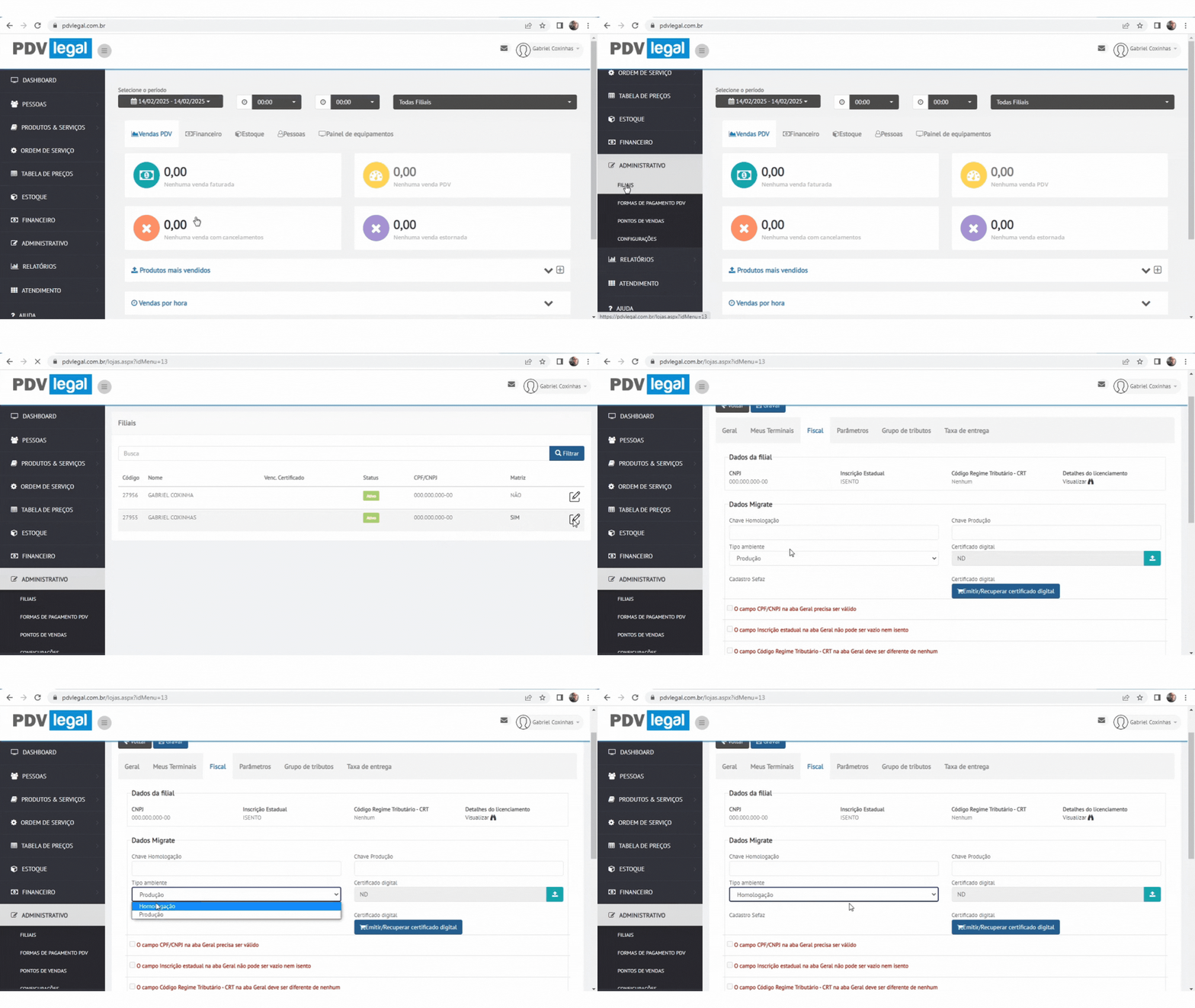
#### **Configure as chaves no Retaguarda Cloud:**
* Acesse **Cloud > Administrativo > Filiais > Selecione a filial > Fiscal**.
* Insira a **chave de homologação** nos campos *Homologação* e *Produção*.
* Em Tipo de Ambiente, selecione **Homologação**.
{% endstep %}
{% step %}
#### **Insira o certificado (NFC-e):**
* Acesse o ambiente de [**homologação da Migrate**](https://homolog.invoicy.com.br/login.aspx).
* **(Apenas no caso de emissão de NFC-e)**: Anexe o **certificado digital** no formato A1 (.PFX).
{% endstep %}
{% step %}
#### **Configure os terminais (NFC-e):**
* Acesse **Retaguarda Cloud > Administrativo > Filiais > Meus Terminais**.
* Selecione o equipamento > **Editar** > Marque **Utiliza NFCe**.
* Insira um **número de série não utilizado** no campo *Série Nota Fiscal*.
{% endstep %}
{% step %}
#### **Volte para o ambiente de produção:**
* Substitua as chaves pelos valores de **produção** (ambos os campos).
* Altere o Tipo de ambiente para **Produção**.
{% endstep %}
{% step %}
#### **Sincronize o PDV (NFC-e):**
* No PDV: **3 pontinhos > Sinc. Tabelas > Continuar**.
* **Configurar > Registrar o sistema > Salvar**.
* **Configurar > Parâmetros do sistema > Corrigir arquivos** (final da tela).
{% endstep %}
{% endstepper %}
***
### Como realizar emissão de NF-e?
{% stepper %}
{% step %}
Acesse o módulo de **Estoque > Notas (Saída)**.
{% endstep %}
{% step %}
Siga o manual [**Configurar NF-e/DANF-e**](/modulo-fiscal/configuracao-da-emissao-de-nf-e-danf-e.md).
{% endstep %}
{% endstepper %}
***
## Preciso de ajuda
{% hint style="danger" %}
* **Problema:** Chaves não funcionam no ambiente de produção.
* **Solução:** Verifique se as chaves de produção foram inseridas corretamente nos dois campos.
* **Problema:** Notas não são autorizadas na homologação.
* **Solução:** Garanta que todas as etapas de teste (nota, contingência, estorno e inutilização) foram concluídas.
{% endhint %}
***
## Dicas rápidas
{% hint style="success" %}
* Salve as chaves de homologação e produção em local seguro.
* Teste sempre no ambiente de homologação antes de migrar para produção.
* Atualize os terminais após mudanças fiscais (**PDV > Sinc. Tabelas**).
{% endhint %}
---
# Agent Instructions
This documentation is published with GitBook. GitBook is the documentation platform designed so that both humans and AI agents can read, navigate, and reason over technical content effectively. Learn more at gitbook.com.
## Querying This Documentation
If you need additional information that is not directly available in this page, you can query the documentation dynamically by asking a question.
Perform an HTTP GET request on the current page URL with the `ask` query parameter, and the optional `goal` query parameter:
```
GET https://ajuda.pdvlegal.com.br/modulo-fiscal/configuracao-do-modulo-fiscal/emissao-para-mato-grosso-do-sul.md?ask=&goal=
```
`ask` is the immediate question: it should be specific, self-contained, and written in natural language.
`goal` is optional and describes the broader end goal you are ultimately trying to accomplish on behalf of the user. GitBook uses it to tailor the answer towards what is most useful for that goal.
The response will contain a direct answer to the question and relevant excerpts and sources from the documentation.
Use this mechanism when the answer is not explicitly present in the current page, you need clarification or additional context, or you want to retrieve related documentation sections.
.gif?alt=media&token=1cb257fb-7c3f-4067-a687-e20985056e10)
.gif?alt=media&token=5e900a25-816a-4f3a-b5f7-37ef74be1705)