# Importação e Exportação de Certificado A1

## Passo a Passo: Importação do Certificado A1

{% stepper %}
{% step %}

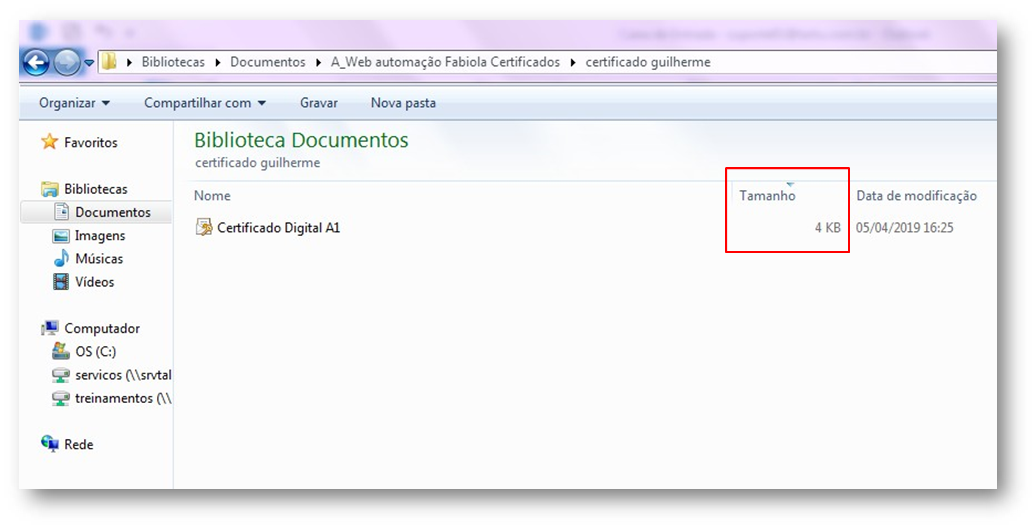
### **Verifique o tamanho**:&#x20;

* Confirme se o arquivo tem **4 KB**.

<figure><img src="https://1320237751-files.gitbook.io/~/files/v0/b/gitbook-x-prod.appspot.com/o/spaces%2FLaIVEmahy7qwD0rmQzED%2Fuploads%2FaCDSzFPhBIkcmIhDvEHL%2Fimpor-a1-1.png?alt=media&#x26;token=a345059e-bd22-4ac4-9063-73fd5d1cc079" alt=""><figcaption></figcaption></figure>
{% endstep %}

{% step %}

### **Instale o certificado**:

* Clique com o botão direito no arquivo `.pfx`
* **Instalar PFX**
  {% endstep %}

{% step %}

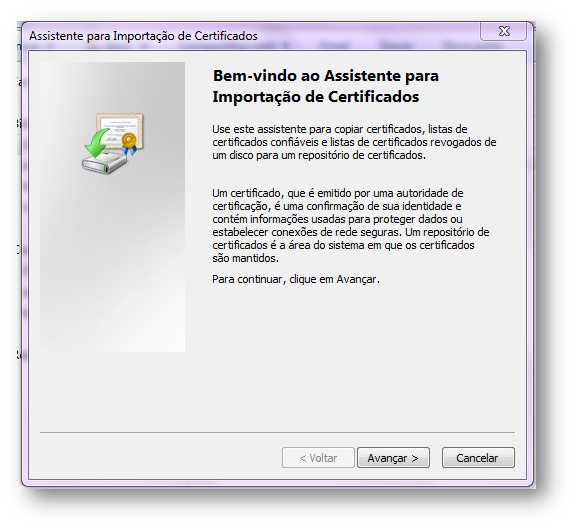
### **Acompanhe o assistente**:

* Clique em **Avançar**&#x20;

<figure><img src="https://1320237751-files.gitbook.io/~/files/v0/b/gitbook-x-prod.appspot.com/o/spaces%2FLaIVEmahy7qwD0rmQzED%2Fuploads%2FhDw68WHgM9okhDrq6TYZ%2Fimpor-a1-2.png?alt=media&#x26;token=5cb78d71-908a-422d-ab2c-e424811ca08b" alt=""><figcaption></figcaption></figure>

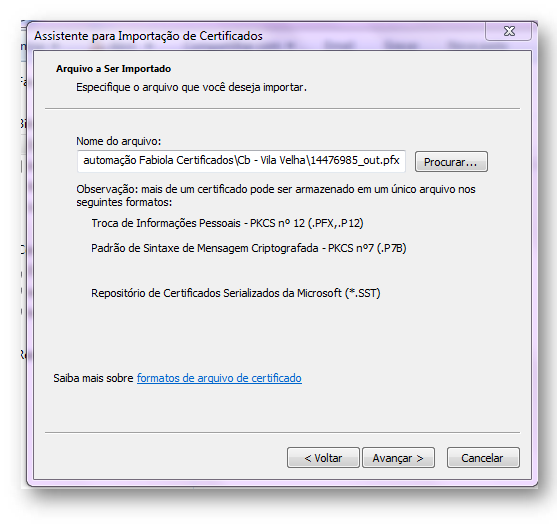
* Selecione o arquivo, e clique novamente em **Avançar.**

<figure><img src="https://1320237751-files.gitbook.io/~/files/v0/b/gitbook-x-prod.appspot.com/o/spaces%2FLaIVEmahy7qwD0rmQzED%2Fuploads%2FENBI1cj3bfO4LjHCxPsd%2Fimpor-a1-3.png?alt=media&#x26;token=e98fbb23-638b-4e0a-aade-62f1739e435f" alt=""><figcaption></figcaption></figure>

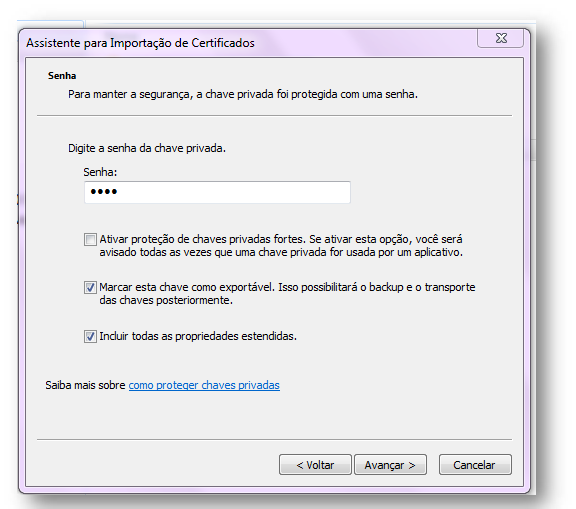
* Digite a **senha** > Marque:
  * *Marcar esta chave como exportável*.
  * *Incluir todas as propriedades estendidas*.

<figure><img src="https://1320237751-files.gitbook.io/~/files/v0/b/gitbook-x-prod.appspot.com/o/spaces%2FLaIVEmahy7qwD0rmQzED%2Fuploads%2FEL4DvNHZ1eGYj7mc3WjH%2Fimpor-a1-4.png?alt=media&#x26;token=697e5e50-144c-42cf-ad5b-595364880983" alt=""><figcaption></figcaption></figure>

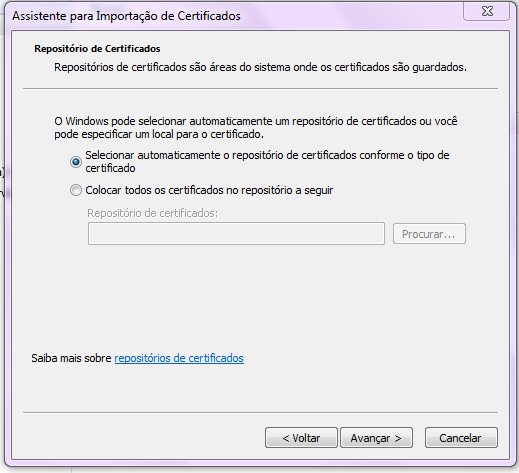
* Selecione: "*Selecionar automaticamente um repositório de certificados conforme tipo de certificado"* > **Avançar**.

<figure><img src="https://1320237751-files.gitbook.io/~/files/v0/b/gitbook-x-prod.appspot.com/o/spaces%2FLaIVEmahy7qwD0rmQzED%2Fuploads%2Fm19Fh9ZvJcvQ5G7QRNUo%2Fimpor-a1-5.png?alt=media&#x26;token=fd65c6fc-7801-46ca-ad5d-6f2af6a5c2f6" alt=""><figcaption></figcaption></figure>
{% endstep %}

{% step %}

### **Finalize**:

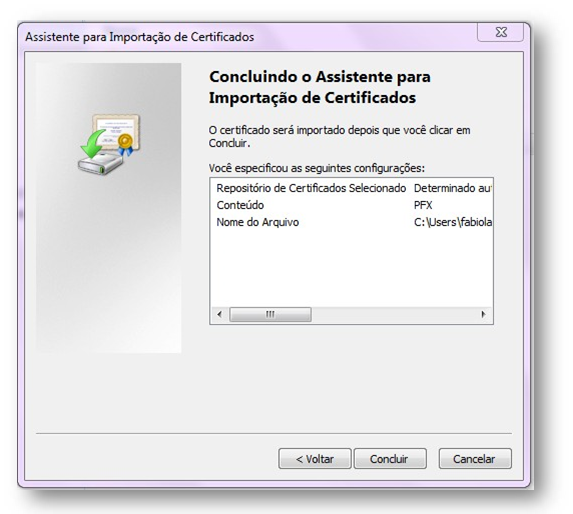
* Clique em **Concluir**.

<figure><img src="https://1320237751-files.gitbook.io/~/files/v0/b/gitbook-x-prod.appspot.com/o/spaces%2FLaIVEmahy7qwD0rmQzED%2Fuploads%2FOYLcpzIOA8FRunPxaBfY%2Fimpor-a1-6.png?alt=media&#x26;token=8b554430-3160-41f9-a8b5-962ece8de307" alt=""><figcaption></figcaption></figure>
{% endstep %}
{% endstepper %}
***

## Passo a Passo: Exportação do Certificado A1

{% stepper %}
{% step %}

### **Abra o Navegador:**

{% hint style="info" %}
Dê preferência ao **Internet Explorer**!
{% endhint %}

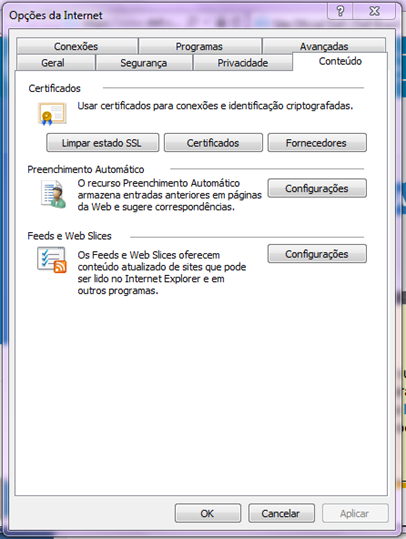
* Clique na **engrenagem** (canto superior direito) > **Opções da Internet**.

<figure><img src="https://1320237751-files.gitbook.io/~/files/v0/b/gitbook-x-prod.appspot.com/o/spaces%2FLaIVEmahy7qwD0rmQzED%2Fuploads%2FK9C2AZoys0NNnDNnQ0Od%2Fexpor-a1-1.avif?alt=media&#x26;token=4686ecb5-a032-4541-85a0-38f2f510364f" alt=""><figcaption></figcaption></figure>
{% endstep %}

{% step %}

### **Acesse os certificados**:

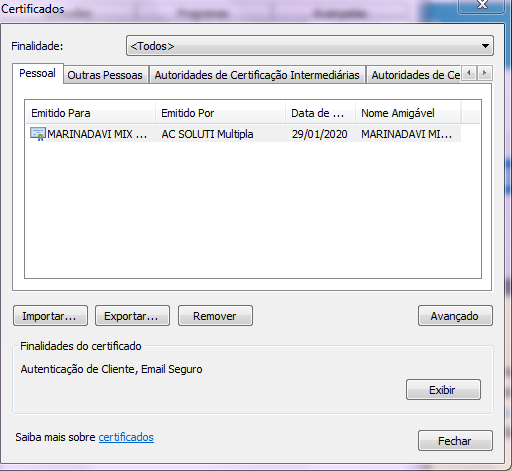
* Vá para **Conteúdo > Certificados**.

<figure><img src="https://1320237751-files.gitbook.io/~/files/v0/b/gitbook-x-prod.appspot.com/o/spaces%2FLaIVEmahy7qwD0rmQzED%2Fuploads%2FB5uw8TJlvKKJ4Fm3XRkq%2Fexpor-a1-2.png?alt=media&#x26;token=5dc199fd-b364-4b35-8b82-888ea051ae9f" alt=""><figcaption></figcaption></figure>
{% endstep %}

{% step %}

### **Exporte o certificado**:

* Selecione o certificado > **Exportar**.

<figure><img src="https://1320237751-files.gitbook.io/~/files/v0/b/gitbook-x-prod.appspot.com/o/spaces%2FLaIVEmahy7qwD0rmQzED%2Fuploads%2FJNj4vuz9oqhHUkoyBnQh%2Fexpor-a1-3.png?alt=media&#x26;token=d17a7770-b2e1-466a-be60-48e3d3c905df" alt=""><figcaption></figcaption></figure>

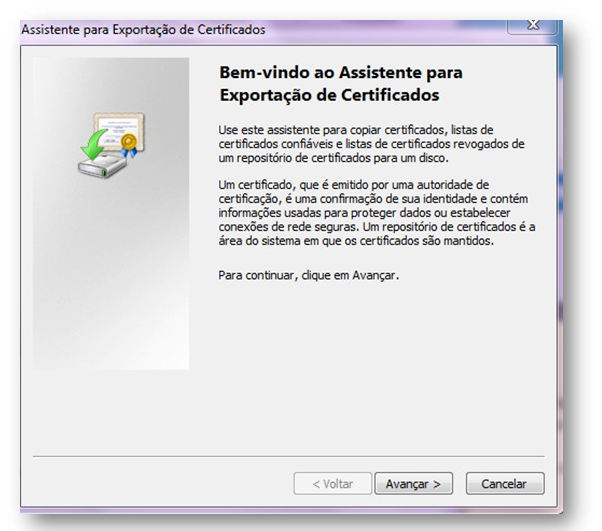
* Cliquer em: **Avançar**&#x20;

<figure><img src="https://1320237751-files.gitbook.io/~/files/v0/b/gitbook-x-prod.appspot.com/o/spaces%2FLaIVEmahy7qwD0rmQzED%2Fuploads%2F5rTPqCGLr3sv32SYdlx1%2Fexpor-a1-4.png?alt=media&#x26;token=bade6641-44c9-4261-b218-b043f6a64ed8" alt=""><figcaption></figcaption></figure>

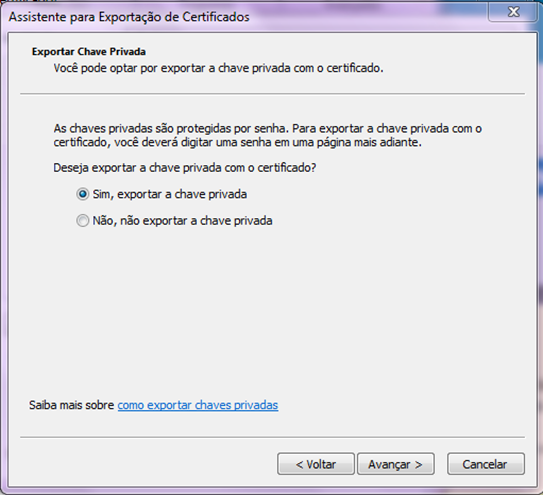
* Marque **Sim, exportar a chave privada** > **Avançar**.

<figure><img src="https://1320237751-files.gitbook.io/~/files/v0/b/gitbook-x-prod.appspot.com/o/spaces%2FLaIVEmahy7qwD0rmQzED%2Fuploads%2FLFom3wHF1nYzvCTTla3K%2Fexpor-a1-5.png?alt=media&#x26;token=e95c714b-f67a-49f8-ae23-31592f474079" alt=""><figcaption></figcaption></figure>

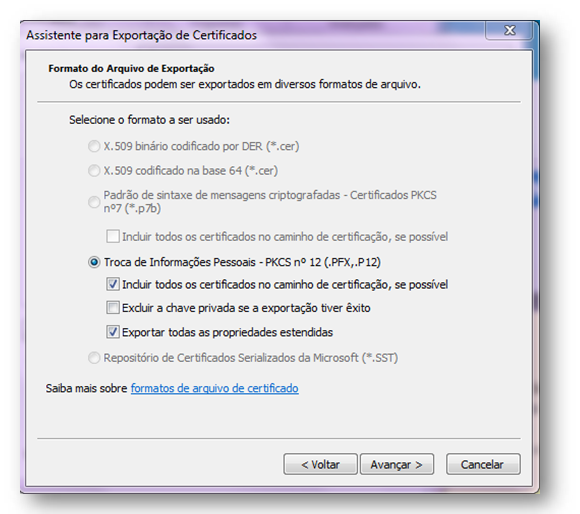
* Selecione **Troca de Informações Pessoais (.PFX)**.
* Marque:
  * *Incluir todos os certificados no caminho de certificação*.
  * *Exportar todas as propriedades estendidas*.

<figure><img src="https://1320237751-files.gitbook.io/~/files/v0/b/gitbook-x-prod.appspot.com/o/spaces%2FLaIVEmahy7qwD0rmQzED%2Fuploads%2F51BAYe6F50KRIzEOlUbW%2Fexpor-a1-6.png?alt=media&#x26;token=006b02a0-42d7-4cc8-a858-586b2f7e529e" alt=""><figcaption></figcaption></figure>

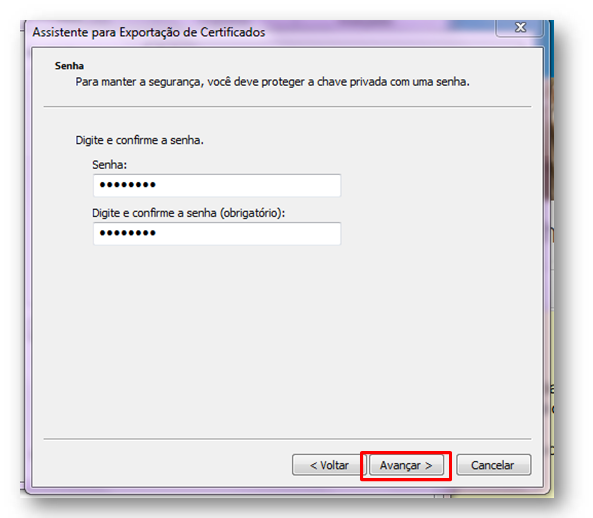
* Digite a **senha** > **Avançar**.

<figure><img src="https://1320237751-files.gitbook.io/~/files/v0/b/gitbook-x-prod.appspot.com/o/spaces%2FLaIVEmahy7qwD0rmQzED%2Fuploads%2FdbJu1mdo1KpH0vP4K9lP%2Fexpor-a1-7.png?alt=media&#x26;token=0bcedff5-8287-41ca-8916-5892c2710341" alt=""><figcaption></figcaption></figure>

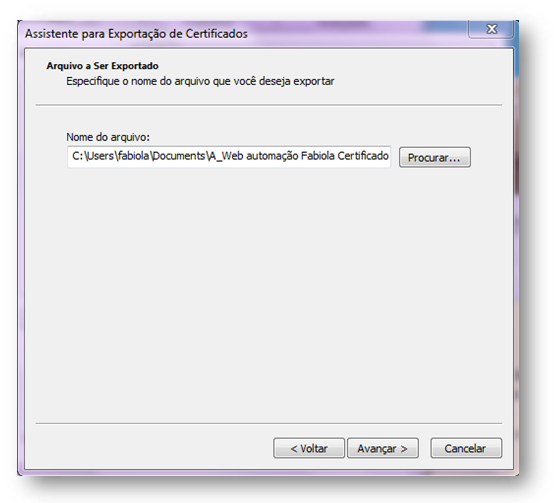
* Em procurar, busque pelo Certificado.

<figure><img src="https://1320237751-files.gitbook.io/~/files/v0/b/gitbook-x-prod.appspot.com/o/spaces%2FLaIVEmahy7qwD0rmQzED%2Fuploads%2Fv7uMxsY5N5vSl5FABd2m%2Fexpor-a1-8.png?alt=media&#x26;token=58f18c83-5db7-47fa-a42b-0afe244cbd46" alt=""><figcaption></figcaption></figure>

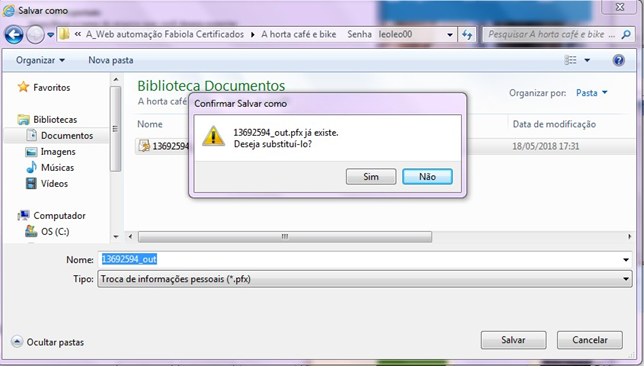
* Ao encontrar, informe como deseja salvá-lo.

<figure><img src="https://1320237751-files.gitbook.io/~/files/v0/b/gitbook-x-prod.appspot.com/o/spaces%2FLaIVEmahy7qwD0rmQzED%2Fuploads%2FCLctmNasNavDngvSU6PM%2Fexpor-a1-9.png?alt=media&#x26;token=a7ff049f-1d0d-40de-a4f4-652b2a564949" alt=""><figcaption></figcaption></figure>
{% endstep %}

{% step %}

### **Salve o arquivo**:

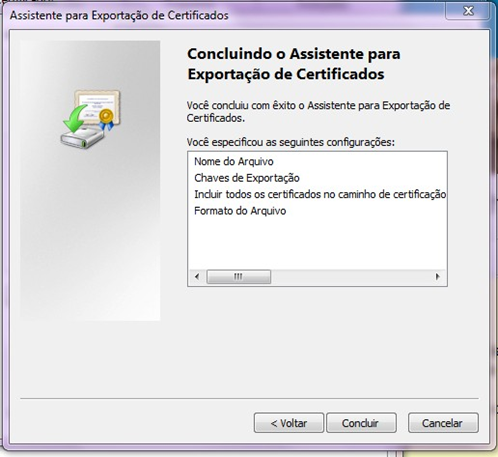
* Escolha o local > **Concluir**.

<figure><img src="https://1320237751-files.gitbook.io/~/files/v0/b/gitbook-x-prod.appspot.com/o/spaces%2FLaIVEmahy7qwD0rmQzED%2Fuploads%2F4bbsx8wmSitHzHDuvS1G%2Fexpor-a1-91.png?alt=media&#x26;token=8628b0f6-5c8f-4b30-ad6e-efffefff161d" alt=""><figcaption></figcaption></figure>
{% endstep %}
{% endstepper %}