> For the complete documentation index, see [llms.txt](https://ajuda.pdvlegal.com.br/llms.txt). Markdown versions of documentation pages are available by appending `.md` to page URLs; this page is available as [Markdown](https://ajuda.pdvlegal.com.br/pdv/configuracao-do-pdv/envio-de-cupom-fiscal-por-e-mail.md).
# Envio de Cupom Fiscal por E-mail
Habilite o envio de cupom por e-mail, configure a mensagem e valide o fluxo pelo Invoicy.
{% hint style="danger" %}
**Pré-requisitos:**
* Solicitar liberação do serviço ao suporte (envie CNPJ do cliente).
* **CPF obrigatório:** A venda deve ter o CPF do cliente registrado.
* E-mail do cliente sem restrições de recebimento.
{% endhint %}
***
### Habilitar o envio por e-mail
{% stepper %}
{% step %}
**Solicite ativação:**
* Abra um chamado com o **suporte** informando o CNPJ do cliente.
* Aguarde um retorno do chamado que vai autorizar a liberação do Painel de controle no [**Invoicy**](/modulo-fiscal/migrate-invoicy.md).
{% hint style="warning" %}
Verifique se você tem permissão de acesso.
{% endhint %}
{% endstep %}
{% step %}
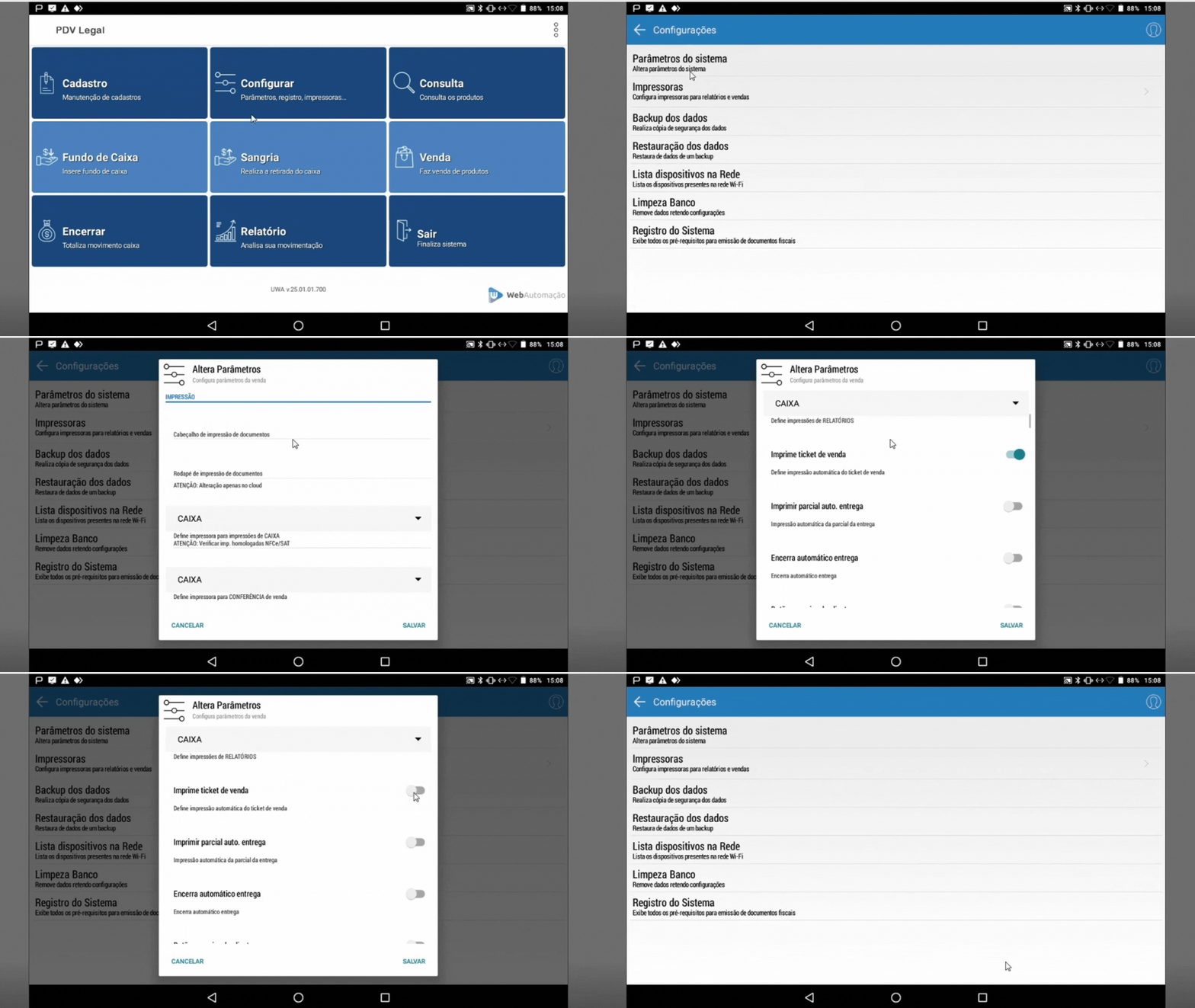
**Desative a impressão física:**
* *PDV > Configurar > Parâmetros* > Desmarque **"Imprime ticket de venda"**.
{% endstep %}
{% endstepper %}
### Enviar cupom após a venda
{% stepper %}
{% step %}
**Registre o CPF:**
* Na venda, insira o CPF do cliente (campo obrigatório).
{% endstep %}
{% step %}
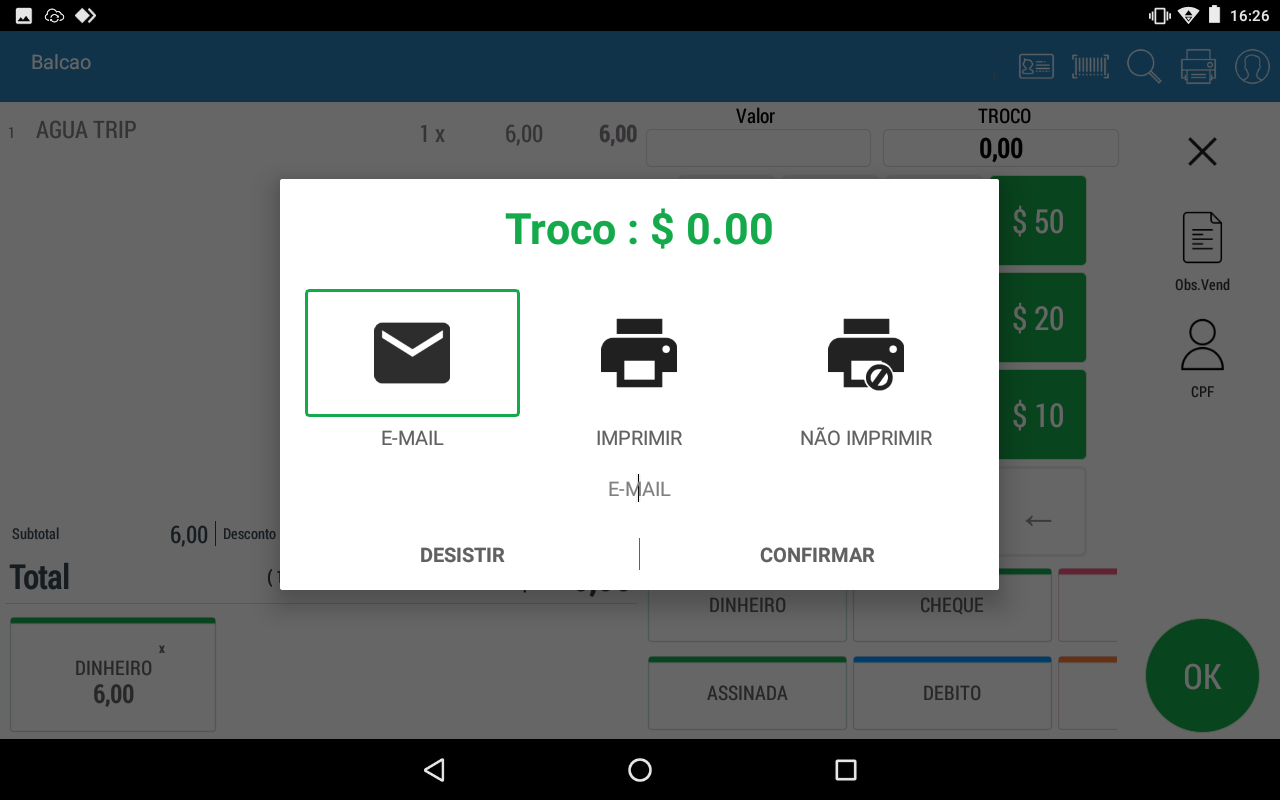
**Finalize a venda:**
* Ao concluir, selecione **"Enviar por e-mail"**.
{% endstep %}
{% step %}
**Insira o e-mail:**
* Digite o e-mail do cliente > Confirme.
{% endstep %}
{% endstepper %}
### Configurar a mensagem de e-mail no Invoicy
{% stepper %}
{% step %}
**Acesse o Invoicy:**
* Entre em [https://web.invoicy.com.br](https://web.invoicy.com.br/).
{% endstep %}
{% step %}
**Edite o template:**
* Painel de controle >> NFC-e >> Configuração dos E-mails
{% endstep %}
{% step %}
**Copie o texto padrão:**
```
Assunto: Envio de Comprovante Cupom Fiscal Emitido
Mensagem Quando Autorizado:
Prezado @NomeDestinatario,
Você está recebendo a @DocCompleto número @DocNumero, série @DocSerie de @NomeEmpresa. Anexo a este e-mail, você está recebendo também o arquivo XML da @DocCompleto.
O que fazer com o @DocPDF?
O @DocPDF, em papel, pode ser arquivado para apresentação ao fisco quando solicitado. Todavia, é estritamente necessário arquivar/armazenar eletronicamente o XML de seus fornecedores. Isso é obrigatório e passível de fiscalização.
Atenciosamente, @NomeEmpresa.
```
{% endstep %}
{% step %}
**Cole o texto copiado em cada lacuna correspondente.**
{% endstep %}
{% step %}
**Salve as alterações.**
{% endstep %}
{% endstepper %}
***
### Resolver problemas comuns
{% hint style="danger" %}
**Problema:** E-mail não chegou.
* *Solução:* Verifique:
* Se o CPF foi inserido na venda.
* Se o e-mail está correto e sem bloqueios.
* **Problema:** Opção de envio não aparece.
* *Solução:* Confira se o serviço foi ativado pelo suporte e se a impressão física está desativada.
* **Problema:** Template de e-mail incorreto.
* *Solução:* Copie exatamente o texto padrão fornecido acima.
{% endhint %}
***
### Dicas rápidas
{% hint style="success" %}
* **Teste o envio:** Faça uma venda teste com seu próprio e-mail/CPF.
* **Mantenha o CPF atualizado:** Solicite sempre o CPF do cliente para evitar falhas.
* **Use variáveis corretamente:**
* `@NomeDestinatario`, `@DocNumero`, `@NomeEmpresa` são preenchidos automaticamente.
{% endhint %}
---
# Agent Instructions
This documentation is published with GitBook. GitBook is the documentation platform designed so that both humans and AI agents can read, navigate, and reason over technical content effectively. Learn more at gitbook.com.
## Querying This Documentation
If you need additional information that is not directly available in this page, you can query the documentation dynamically by asking a question.
Perform an HTTP GET request on the current page URL with the `ask` query parameter, and the optional `goal` query parameter:
```
GET https://ajuda.pdvlegal.com.br/pdv/configuracao-do-pdv/envio-de-cupom-fiscal-por-e-mail.md?ask=&goal=
```
`ask` is the immediate question: it should be specific, self-contained, and written in natural language.
`goal` is optional and describes the broader end goal you are ultimately trying to accomplish on behalf of the user. GitBook uses it to tailor the answer towards what is most useful for that goal.
The response will contain a direct answer to the question and relevant excerpts and sources from the documentation.
Use this mechanism when the answer is not explicitly present in the current page, you need clarification or additional context, or you want to retrieve related documentation sections.