> For the complete documentation index, see [llms.txt](https://ajuda.pdvlegal.com.br/llms.txt). Markdown versions of documentation pages are available by appending `.md` to page URLs; this page is available as [Markdown](https://ajuda.pdvlegal.com.br/pdv/modulos-de-operacao/autoatendimento/modo-autonomo.md).
# Modo Autônomo
Configure o modo autônomo para operações sem apoio do operador no terminal.
{% hint style="warning" %}
Use o **Modo Autônomo** em operações sem apoio do operador.
* Não há impressão local de cupom fiscal no terminal.
* A emissão fiscal é realizada via cloud. O cliente pode informar o **e-mail** para receber o documento fiscal.
{% endhint %}
{% hint style="danger" %}
Antes de ativar, confirme estes pré-requisitos:
* Produtos cadastrados no Cloud com **fotos** (opcional, mas recomendado).
* Para terminais que não são SmartPOS, é necessário contrato e pinpad para TEF. Se precisar, consulte o [**manual de TEF**](/integracoes/m-sitef.md).
{% endhint %}
### Quando usar
O Modo Autônomo exibe os produtos com **foto** para o cliente navegar e tocar no que deseja.
* **Indicado para:** mercados autônomos.
* **Também funciona em:** locais com grande circulação de pessoas, como hospitais, usando impressoras de expedição.
{% hint style="warning" %}
O Modo Autônomo **não aceita modificadores**. Ele é feito para produtos prontos.
A impressão de produção funciona normalmente.
Se a operação precisa de modificadores, use o [Autoatendimento Legal](https://ajuda.pdvlegal.com.br/operacoes-avancadas/autoatendimento-legal) ou o [Autoatendimento Food (TokMenu)](https://ajuda.pdvlegal.com.br/integracoes/autoatendimento-food-tokmenu).
{% endhint %}
### Configurar no Retaguarda Cloud
{% stepper %}
{% step %}
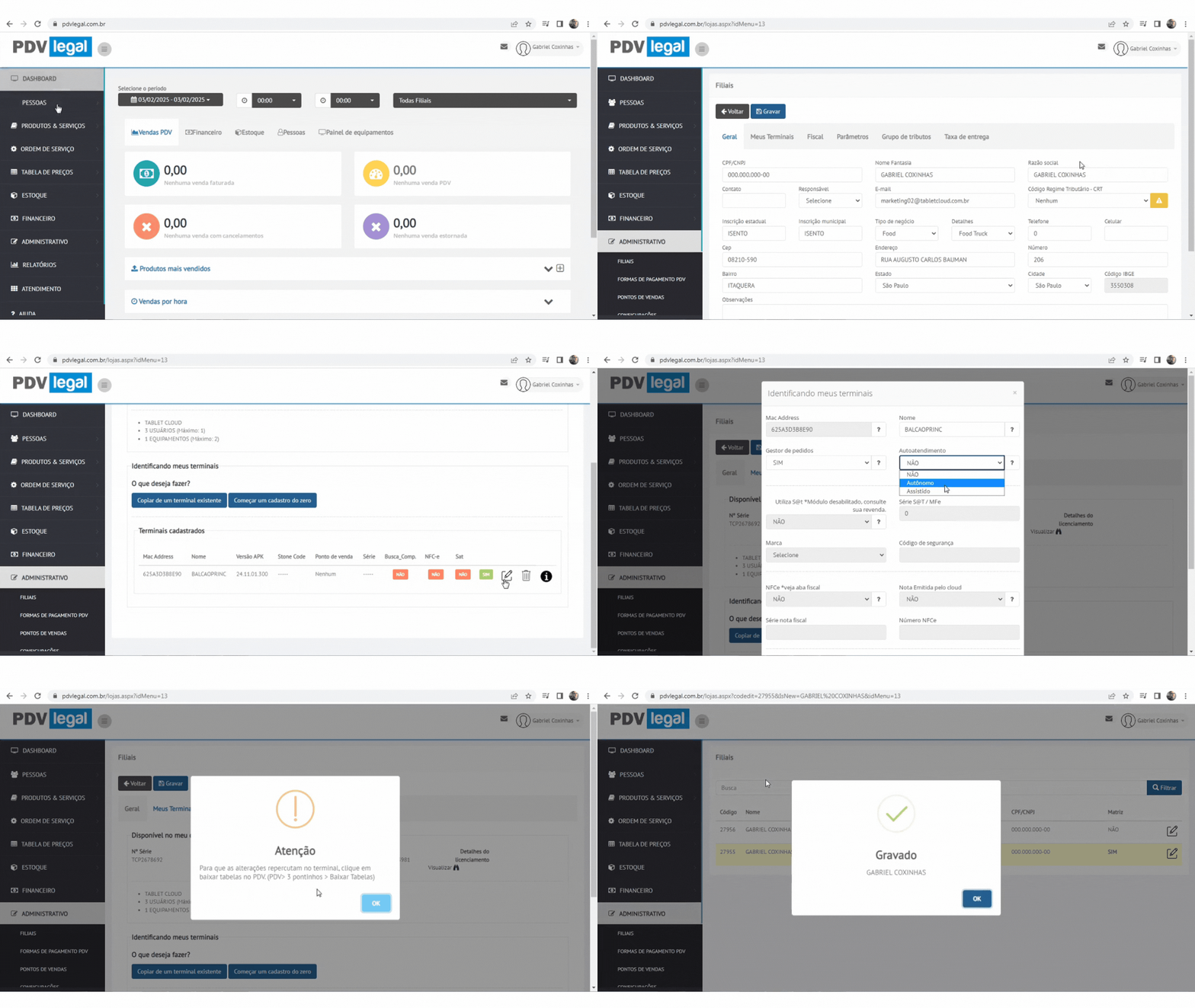
### Vincule o terminal ao modo autônomo
Vá em **Retaguarda Cloud → Administrativo → Filiais → Meus Equipamentos**.
Selecione o terminal e marque **Modo Autônomo**.
{% endstep %}
{% endstepper %}
### Configurar no PDV
{% stepper %}
{% step %}
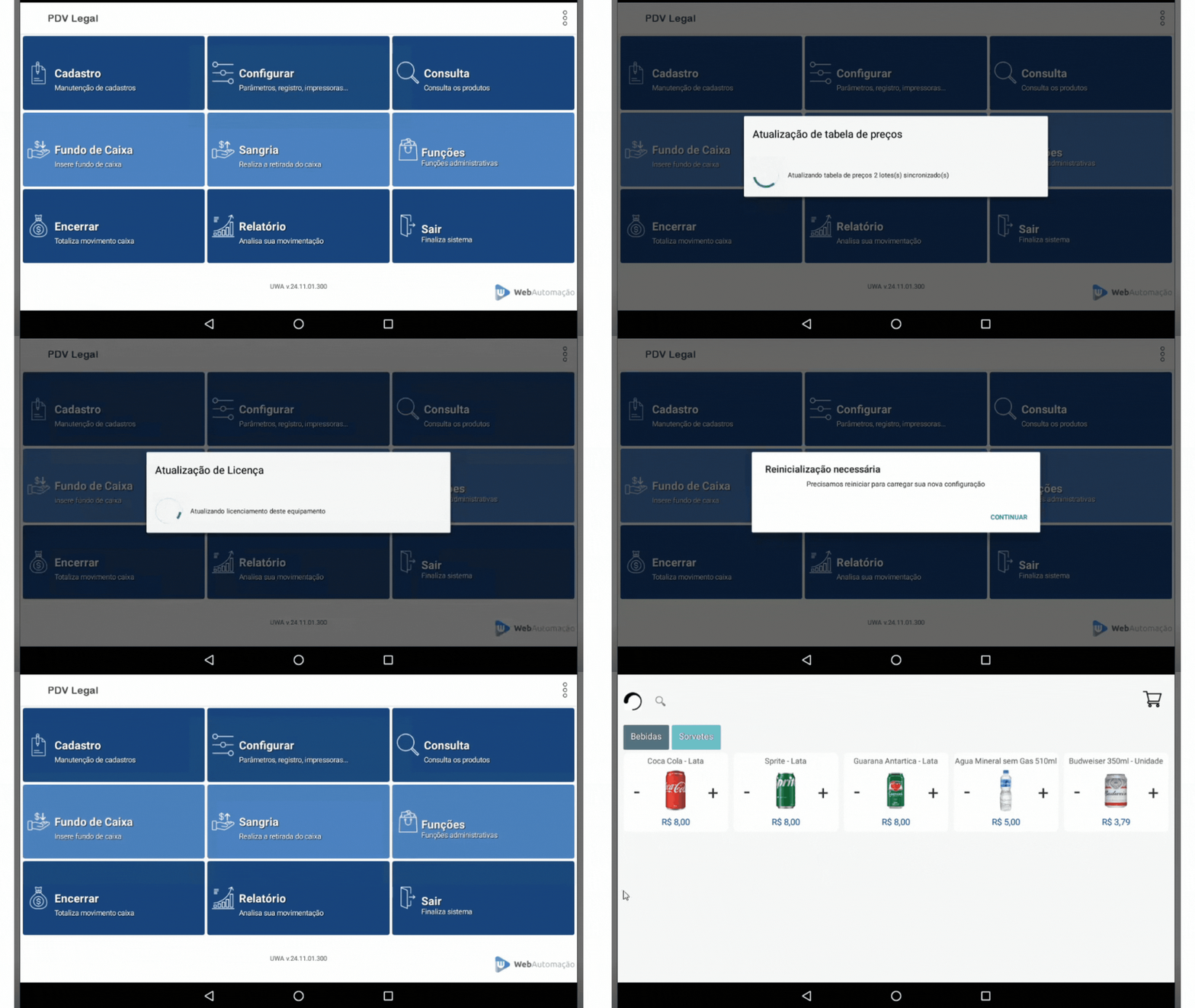
### Sincronize as tabelas
Após realizar a configuração no Retaguarda Cloud, acesse **+Funções → Sincronizar**.
{% endstep %}
{% step %}
### Ative o modo autônomo
Deixe o PDV na tela inicial por **10 segundos**.
O sistema entrará automaticamente no modo.
{% endstep %}
{% endstepper %}
### Fluxo do cliente
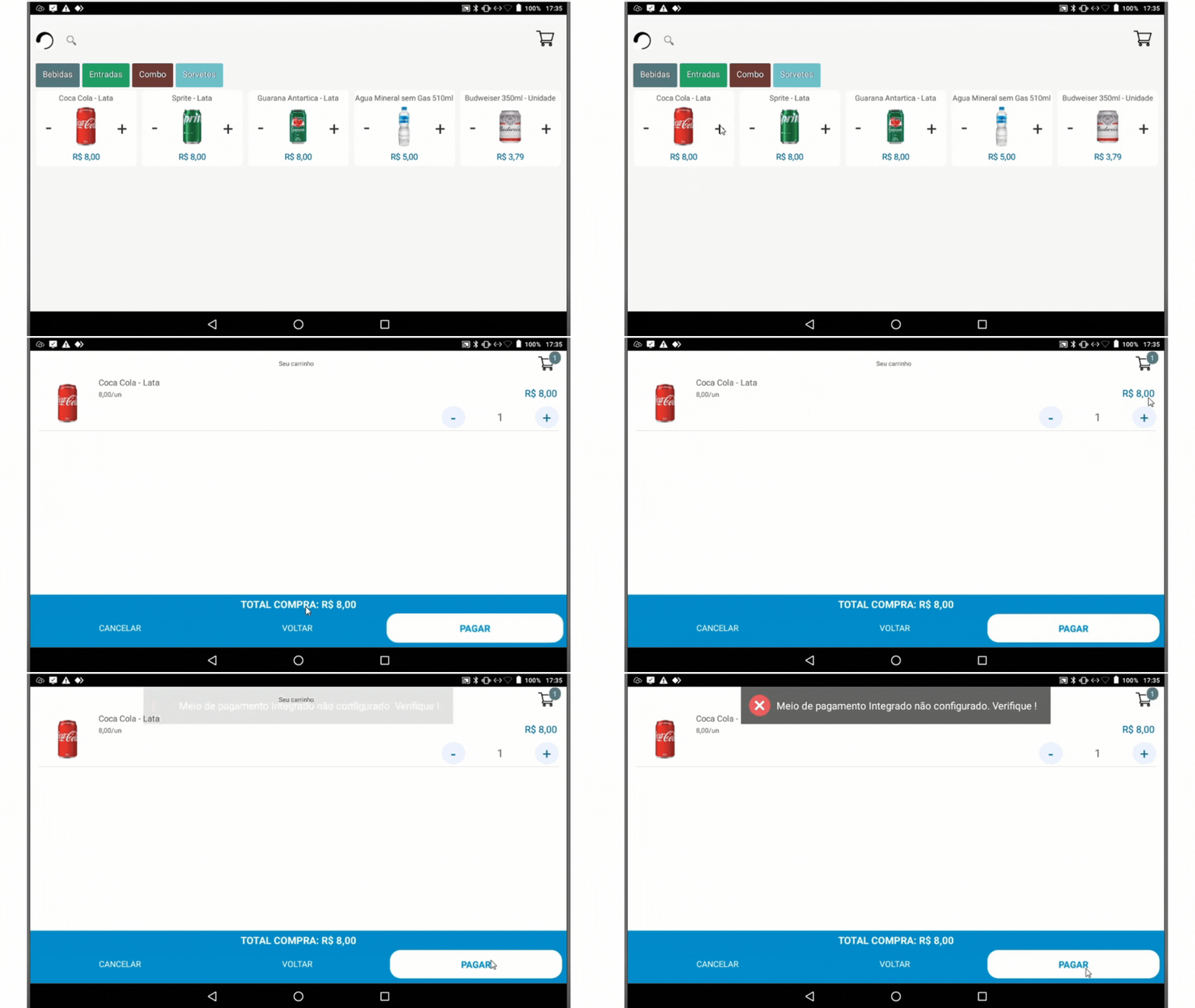
1. **Selecionar produtos:**
* Toque nos itens desejados (fotos facilitam a identificação).
* O leitor de código de barras continua funcionando: o cliente também pode lançar os produtos pela leitura do código.
2. **Ver carrinho:**
* Toque no ícone do carrinho (canto superior direito) ou em **"VER CARRINHO"**.
3. **Confirmar itens:**
* Revise quantidades > Toque em **PAGAR**.
4. **Pagamento:**
* Selecione a forma de pagamento (ex.: PIX, cartão) > Finalize.
---
# Agent Instructions
This documentation is published with GitBook. GitBook is the documentation platform designed so that both humans and AI agents can read, navigate, and reason over technical content effectively. Learn more at gitbook.com.
## Querying This Documentation
If you need additional information that is not directly available in this page, you can query the documentation by asking a question.
Perform an HTTP GET request on the following URL with the `ask` and `goal` query parameters:
```
GET https://ajuda.pdvlegal.com.br/pdv/modulos-de-operacao/autoatendimento/modo-autonomo.md?ask=&goal=
```
`ask` is the immediate question: it should be specific, self-contained, and written in natural language.
`goal` is what the user is ultimately trying to achieve, the reason they need the answer. Sharing it helps GitBook give you a better, more relevant answer. A goal is most helpful when it describes the outcome the user wants rather than restating the question. For example, with `ask=how do I create an API token`, a goal like `automate deployments from our CI pipeline` lets GitBook tailor the answer to that use case.
The response will contain a direct answer to the question and relevant excerpts and sources from the documentation.
Use this mechanism when the answer is not explicitly present in the current page, you need clarification or additional context, or you want to retrieve related documentation sections.