> For the complete documentation index, see [llms.txt](https://ajuda.pdvlegal.com.br/llms.txt). Markdown versions of documentation pages are available by appending `.md` to page URLs; this page is available as [Markdown](https://ajuda.pdvlegal.com.br/pdv/modulos-de-operacao/modulo-mesas-comandas/controle-de-vendas-por-lugar-na-mesa.md).
# Controle de vendas por lugar na mesa
## Entender o controle de vendas por lugar na mesa
* Funcionalidade para **segmentar vendas por posições/lugares em uma mesma mesa**.
* Ideal para restaurantes ou bares onde clientes dividem a mesa mas pagam individualmente.
* **Exemplo:** Mesa 5 com 4 lugares (cada cliente tem seu consumo registrado separadamente).
## Configurar vendas por lugar na mesa
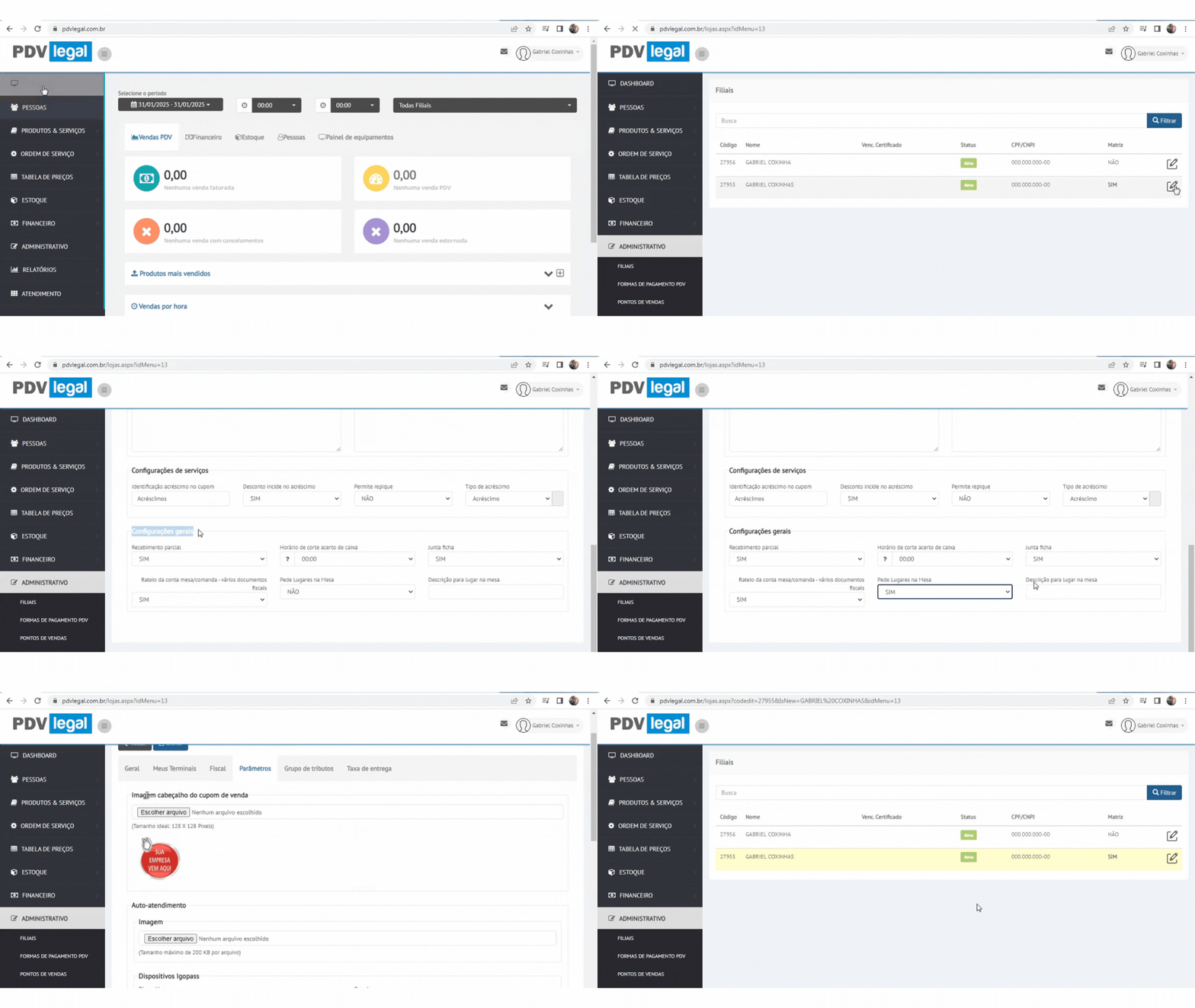
**1 - Habilitar no Retaguarda Cloud:**
* **Pré-requisito:** Feche todas as mesas em aberto no PDV.
* Acesse **Retaguarda Cloud > Administrativo > Filiais > Parâmetros:**
* Ative **Pede Lugar na Mesa = SIM**.
* Nomeie o campo ao lado como **"Lugar"** ou **"Posição"**.
* **Sincronize tabelas** no PDV.
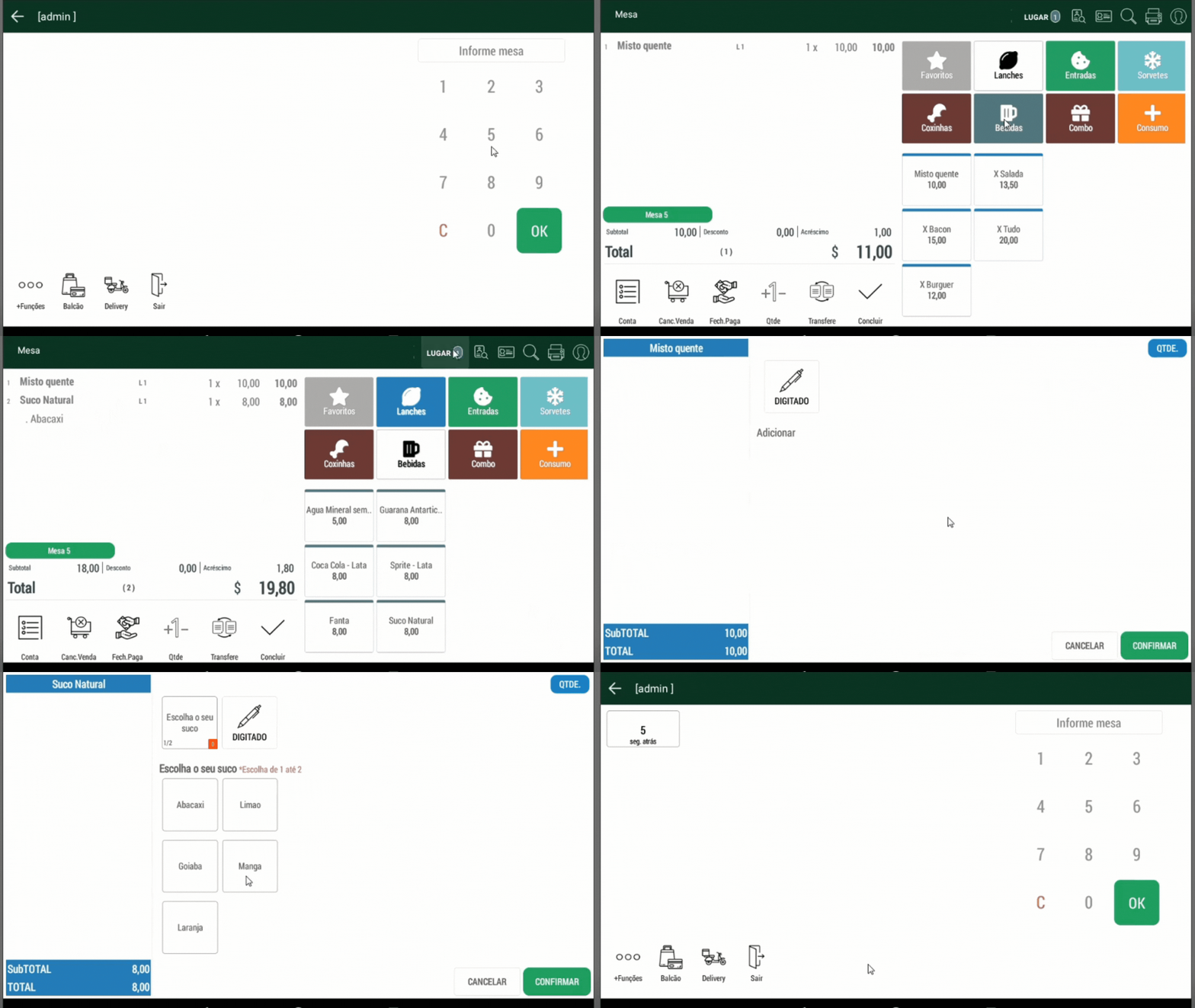
**2 - Usar no PDV (Módulo Mesa):**
* **Posição padrão:** As vendas são lançadas na **Posição 1** automaticamente.
* **Alterar posição:**
* Clique no **ícone de posição** (parte superior da tela) > Selecione a posição desejada (ex.: Posição 2).
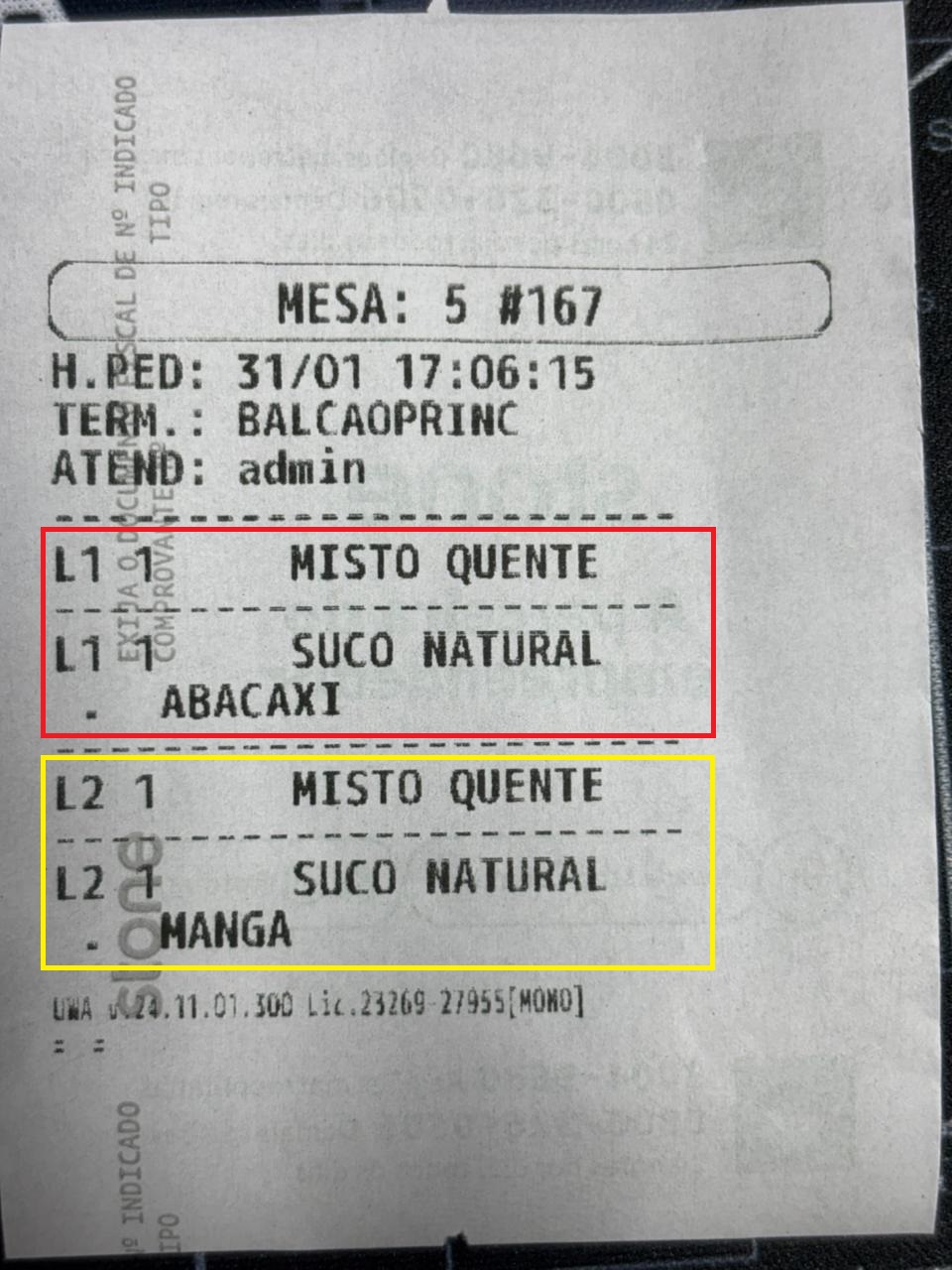
* **Impressão da conta:**
* Mostra o consumo **separado por posição** (ex.: **"L1**" e **"L2"**).
***
### Resolver problemas comuns
{% hint style="danger" %}
* **Problema:** Ícone de posição não aparece.
* *Solução:* Verifique se o parâmetro **Pede Lugar na Mesa** está ativo e sincronize tabelas.
* **Problema:** Erro ao alterar posição.
* *Solução:* Feche todas as mesas em aberto antes de habilitar a função.
* **Problema:** Consumo misturado na impressão.
* *Solução:* Confira se cada item foi lançado na posição correta antes de fechar a venda.
{% endhint %}
### Dicas rápidas
{% hint style="success" %}
* **Treine a equipe:** Explique a diferença entre **Posição** (consumo individual) e **Mesa** (consumo coletivo).
* **Padronize nomes:** Use "Posição 1", "Lugar A", etc., para facilitar a identificação.
* **Verifique a conta:** Antes de fechar, confira o resumo por posição no PDV.
* **Use em casos como:**
* Grupos que dividem a mesa mas pagam separadamente.
* Eventos com consumo individual (ex.: happy hours).
{% endhint %}
---
# Agent Instructions
This documentation is published with GitBook. GitBook is the documentation platform designed so that both humans and AI agents can read, navigate, and reason over technical content effectively. Learn more at gitbook.com.
## Querying This Documentation
If you need additional information that is not directly available in this page, you can query the documentation by asking a question.
Perform an HTTP GET request on the following URL with the `ask` and `goal` query parameters:
```
GET https://ajuda.pdvlegal.com.br/pdv/modulos-de-operacao/modulo-mesas-comandas/controle-de-vendas-por-lugar-na-mesa.md?ask=&goal=
```
`ask` is the immediate question: it should be specific, self-contained, and written in natural language.
`goal` is what the user is ultimately trying to achieve, the reason they need the answer. Sharing it helps GitBook give you a better, more relevant answer. A goal is most helpful when it describes the outcome the user wants rather than restating the question. For example, with `ask=how do I create an API token`, a goal like `automate deployments from our CI pipeline` lets GitBook tailor the answer to that use case.
The response will contain a direct answer to the question and relevant excerpts and sources from the documentation.
Use this mechanism when the answer is not explicitly present in the current page, you need clarification or additional context, or you want to retrieve related documentation sections.