> For the complete documentation index, see [llms.txt](https://ajuda.pdvlegal.com.br/llms.txt). Markdown versions of documentation pages are available by appending `.md` to page URLs; this page is available as [Markdown](https://ajuda.pdvlegal.com.br/retaguarda/modulo-servicos/ordem-de-servico.md).
# Ordem de serviço
Abra, acompanhe e conclua ordens de serviço com cliente, serviços, pagamento e emissão de NFS-e.
{% hint style="info" %}
Você pode criar a ordem de serviço na **Retaguarda** ou no **Gestão Legal**.
{% endhint %}
{% hint style="warning" %}
Não crie a mesma OS nos dois ambientes.
Ao salvar em um deles, o sistema replica a ordem automaticamente no outro.
{% endhint %}
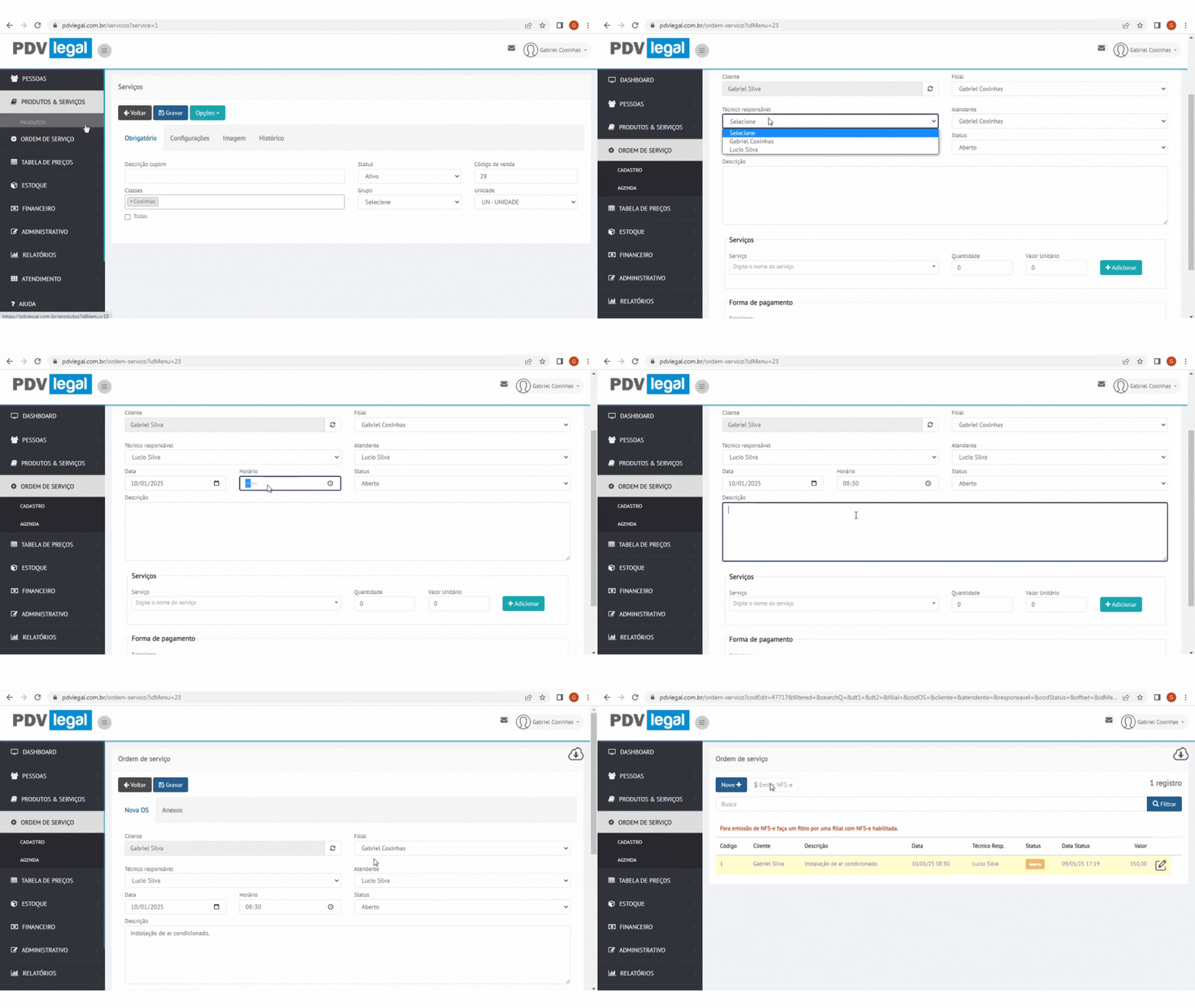
### Criando pela Retaguarda
{% stepper %}
{% step %}
### Acesse o cadastro de OS
Vá em **Ordem de Serviço → Cadastro → Novo +**.
{% endstep %}
{% step %}
### Selecione o cliente
Se ele ainda não existir, cadastre o cliente na hora.
{% endstep %}
{% step %}
### Preencha os dados gerais
Informe:
* filial
* técnico responsável
* atendente
* data e horário
* descrição do atendimento
{% endstep %}
{% step %}
### Adicione os serviços
Para cada item, revise:
* quantidade
* valor unitário
* valor final
{% endstep %}
{% step %}
### Defina pagamento e ajustes
Se precisar, aplique desconto ou acréscimo.
{% endstep %}
{% step %}
### Anexe arquivos, se necessário
Exemplos:
* foto do serviço
* comprovante assinado
* material de apoio para o técnico
{% endstep %}
{% step %}
### Grave a ordem de serviço
Clique em **Gravar**.
{% endstep %}
{% endstepper %}
### Status da ordem de serviço
A OS pode passar por estes status:
* **Aberto**
* **Em andamento**
* **Concluído**
* **Cancelado**
Enquanto estiver aberta, você pode ajustar praticamente todos os dados da ordem.
### Recursos úteis da OS
Na lista e na edição da OS, você pode:
* visualizar o histórico
* consultar anexos
* gerar o link de impressão
* revisar a nota vinculada
### Emitir a NFS-e pela OS
Depois de concluir a ordem:
1. filtre a lista pela filial correta
2. selecione a OS
3. clique em **Emitir NFS-e**
4. revise a descrição da nota
5. grave a emissão
O sistema envia a nota para processamento.
{% hint style="info" %}
O retorno da prefeitura não é instantâneo.
Enquanto a nota estiver em processamento, ela pode aparecer pendente na listagem.
{% endhint %}
### Acompanhar o resultado da emissão
Depois do envio, valide:
* número da nota
* status da emissão
* mensagem de rejeição, quando existir
Se a prefeitura rejeitar a nota, ajuste o cadastro ou a configuração fiscal e tente novamente.
---
# Agent Instructions
This documentation is published with GitBook. GitBook is the documentation platform designed so that both humans and AI agents can read, navigate, and reason over technical content effectively. Learn more at gitbook.com.
## Querying This Documentation
If you need additional information that is not directly available in this page, you can query the documentation by asking a question.
Perform an HTTP GET request on the following URL with the `ask` and `goal` query parameters:
```
GET https://ajuda.pdvlegal.com.br/retaguarda/modulo-servicos/ordem-de-servico.md?ask=&goal=
```
`ask` is the immediate question: it should be specific, self-contained, and written in natural language.
`goal` is what the user is ultimately trying to achieve, the reason they need the answer. Sharing it helps GitBook give you a better, more relevant answer. A goal is most helpful when it describes the outcome the user wants rather than restating the question. For example, with `ask=how do I create an API token`, a goal like `automate deployments from our CI pipeline` lets GitBook tailor the answer to that use case.
The response will contain a direct answer to the question and relevant excerpts and sources from the documentation.
Use this mechanism when the answer is not explicitly present in the current page, you need clarification or additional context, or you want to retrieve related documentation sections.