> For the complete documentation index, see [llms.txt](https://ajuda.pdvlegal.com.br/llms.txt). Markdown versions of documentation pages are available by appending `.md` to page URLs; this page is available as [Markdown](https://ajuda.pdvlegal.com.br/retaguarda/pessoas/perfis-de-usuarios.md).
# Perfis de usuários
Entenda a diferença entre perfis e usuários no PDV e na Retaguarda Cloud.
Perfis de usuários definem quais funções e módulos cada colaborador pode acessar.
Eles ajudam a padronizar permissões e reduzem acessos indevidos no PDV e na Retaguarda Cloud.
### Como a estrutura funciona
* **Perfis de usuário PDV:** controlam os acessos dos usuários que operam o PDV.
* **Perfis de usuário ADM:** controlam os acessos dos usuários administrativos na Retaguarda Cloud.
* **Usuários PDV:** são os operadores vinculados a um perfil e a uma filial.
* **Usuários ADM:** são os usuários administrativos vinculados a perfis de acesso.
No PDV, o acesso costuma usar senha numérica de quatro dígitos.
### Exemplo prático
* **Caixa**: Usuário com acesso restrito ao PDV para realizar vendas.
* **Garçom**: Usuário com acesso ao PDV para registrar pedidos.
* **Financeiro**: Usuário com acesso à retaguarda para gerenciar finanças.
* **Gerencial**: Usuário com acesso completo aos módulos de administração.
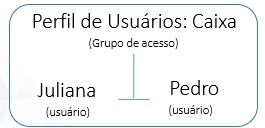
No perfil **Caixa**, por exemplo, você pode ter dois usuários, como Juliana e Pedro.
Nesse caso, ambos herdam as mesmas permissões porque pertencem ao mesmo perfil.
### Próximo passo
Depois desse conceito, siga para:
* [**Perfis de usuário ADM**](/retaguarda/pessoas/perfis-de-usuario-adm.md)
* [**Perfis de usuário PDV**](/retaguarda/pessoas/perfis-de-usuario-pdv.md)
---
# Agent Instructions
This documentation is published with GitBook. GitBook is the documentation platform designed so that both humans and AI agents can read, navigate, and reason over technical content effectively. Learn more at gitbook.com.
## Querying This Documentation
If you need additional information that is not directly available in this page, you can query the documentation by asking a question.
Perform an HTTP GET request on the following URL with the `ask` and `goal` query parameters:
```
GET https://ajuda.pdvlegal.com.br/retaguarda/pessoas/perfis-de-usuarios.md?ask=&goal=
```
`ask` is the immediate question: it should be specific, self-contained, and written in natural language.
`goal` is what the user is ultimately trying to achieve, the reason they need the answer. Sharing it helps GitBook give you a better, more relevant answer. A goal is most helpful when it describes the outcome the user wants rather than restating the question. For example, with `ask=how do I create an API token`, a goal like `automate deployments from our CI pipeline` lets GitBook tailor the answer to that use case.
The response will contain a direct answer to the question and relevant excerpts and sources from the documentation.
Use this mechanism when the answer is not explicitly present in the current page, you need clarification or additional context, or you want to retrieve related documentation sections.