> For the complete documentation index, see [llms.txt](https://ajuda.pdvlegal.com.br/llms.txt). Markdown versions of documentation pages are available by appending `.md` to page URLs; this page is available as [Markdown](https://ajuda.pdvlegal.com.br/retaguarda/tabela-de-precos/modulo-promocoes.md).
# Módulo Promoções
Crie promoções por classe, defina vigência e sincronize as regras no PDV.
Use o módulo para criar promoções por classe e aplicar descontos automáticos no PDV.
{% hint style="danger" %}
Esta funcionalidade está disponível apenas para o **Módulo Balcão**.
{% endhint %}
### Criar uma promoção
{% stepper %}
{% step %}
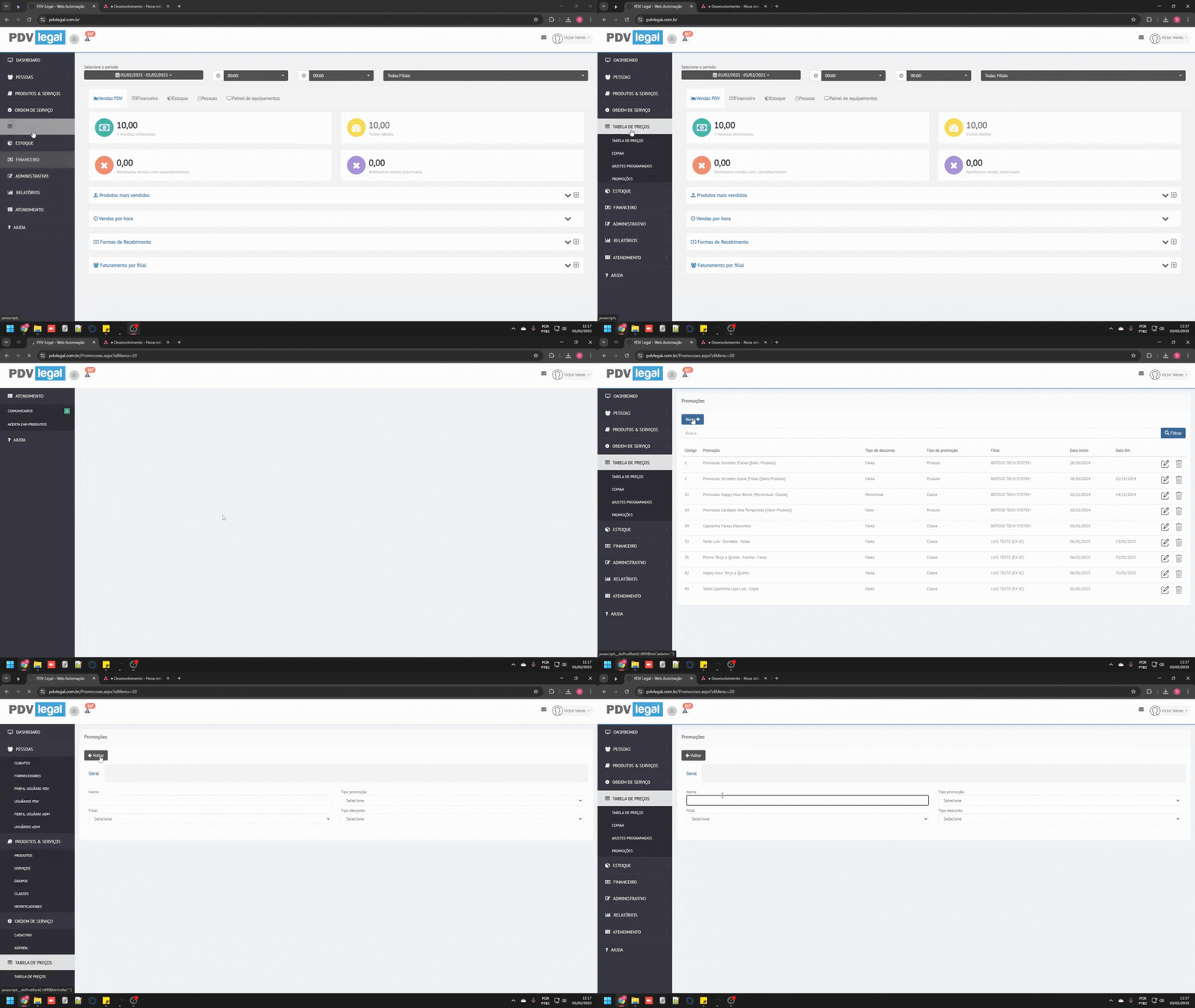
### Acesse o módulo Promoções
* **Retaguarda Cloud > Tabela de Preços > Promoções**
* Clique em **+ Novo** para criar uma **nova promoção**.
{% endstep %}
{% step %}
### Preencha os campos obrigatórios
* **Nome da promoção** (mínimo 15 caracteres)
* **Tipo de promoção** (selecione *Classe* - funcionalidade ativa)
* **Filial** de aplicação
* **Tipo de desconto** (por enquanto, apenas *Faixa*)
{% endstep %}
{% step %}
### Defina dias e horários de validade
* Marque os dias da semana (ex.: terça, quarta, quinta).
* Personalize horários específicos (ex.: 18h às 20h).
* Defina **vigência**:
* **Início**: data de ativação (ex.: dia atual).
* **Fim**: deixe em branco para promoções contínuas ou defina data final.
{% endstep %}
{% step %}
### Vincule classes de produtos
{% hint style="danger" %}
Requisitos:
* [**Criar e vincular produtos a classes**](/retaguarda/produtos/cadastro-de-classes-de-produtos.md) antes de montar a promoção
{% endhint %}
* Adicione produtos às classes através do menu **Produtos Relacionados**.
{% endstep %}
{% step %}
### Crie faixas de desconto
* Clique no ícone **+ Faixa**.
* Defina intervalos (ex.: *1-5 produtos: 10%*, *6-10 produtos: 20%*).
* Grave cada faixa.
{% endstep %}
{% step %}
### Clique em **Gravar** para salvar a promoção.
{% endstep %}
{% step %}
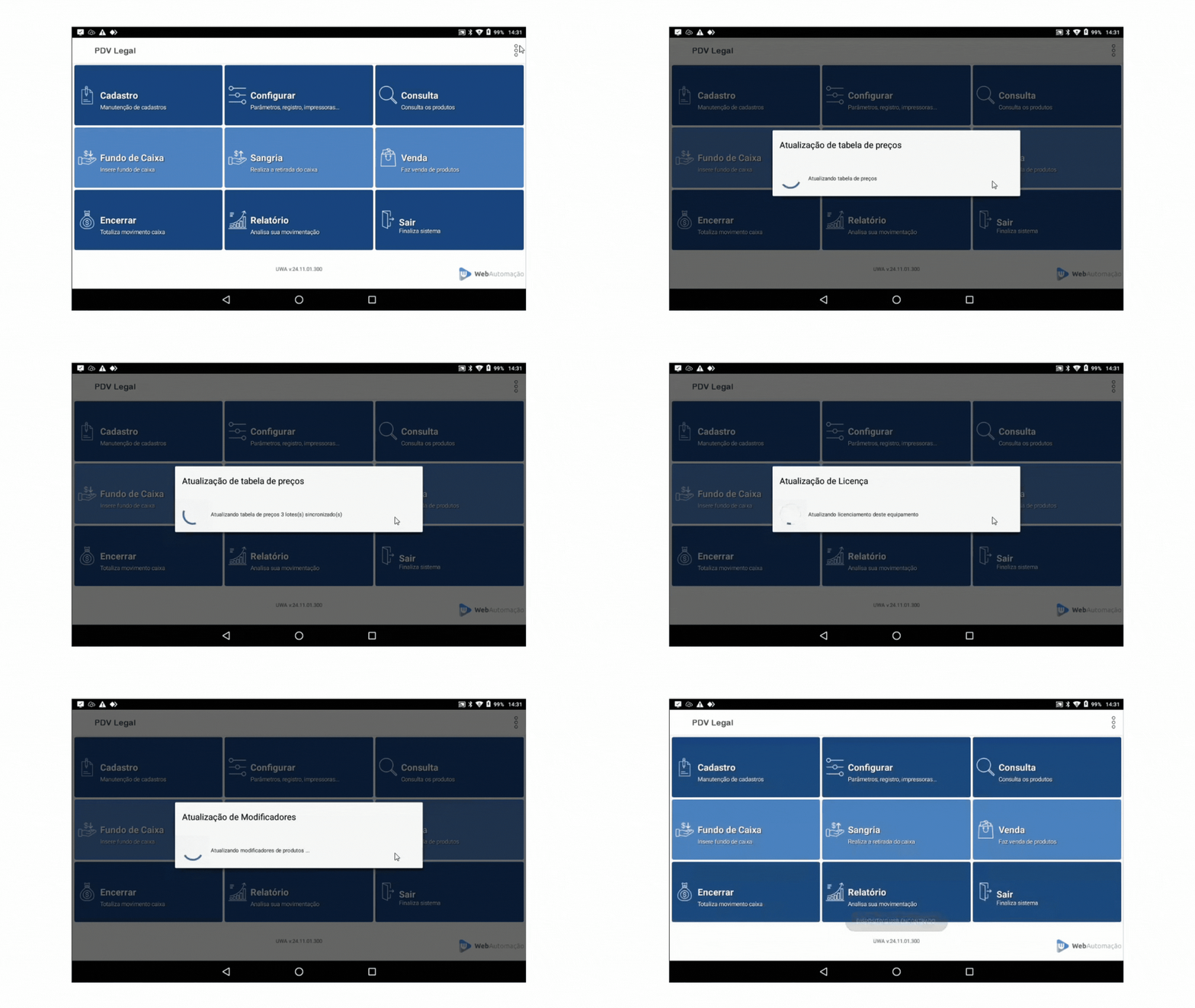
### Sincronize e teste no PDV
{% hint style="danger" %}
Certifique-se que esteja na versão 25.01.01.700 ou superior.
{% endhint %}
* **Sincronize tabelas:**
* Clique no ícone de três pontos,
* Em seguida, clique em "Baixar tabelas"
* Simule uma venda para certificar que as promoções estão funcionando corretamente:
{% endstep %}
{% endstepper %}
### Dúvidas comuns
{% hint style="danger" %}
* **Problema:** Horários quebrados (ex.: 17h30) não são aceitos.\
**Solução:** Por limitação técnica, use apenas horas cheias (ex.: 17h ou 18h).
* **Problema:** Produto aparece em múltiplas promoções simultaneamente.\
**Solução:** O sistema bloqueia conflitos automaticamente. Revise classes vinculadas.
* **Problema:** Desconto não aplicado no PDV.\
**Solução:** Verifique se:
* Usa a versão **25.01.01.700 ou superior.**
* Baixou tabelas atualizadas (**Menu > Baixar Tabelas**).
{% endhint %}
### Boas práticas
{% hint style="success" %}
* **Teste internamente** antes de aplicar em clientes finais.
* Use **nomes descritivos** para promoções (ex.: "Chope Happy Hour Terça").
* Crie **classes genéricas** (ex.: "Promoções Verão") para agilizar cadastros.
{% endhint %}
---
# Agent Instructions
This documentation is published with GitBook. GitBook is the documentation platform designed so that both humans and AI agents can read, navigate, and reason over technical content effectively. Learn more at gitbook.com.
## Querying This Documentation
If you need additional information that is not directly available in this page, you can query the documentation by asking a question.
Perform an HTTP GET request on the following URL with the `ask` and `goal` query parameters:
```
GET https://ajuda.pdvlegal.com.br/retaguarda/tabela-de-precos/modulo-promocoes.md?ask=&goal=
```
`ask` is the immediate question: it should be specific, self-contained, and written in natural language.
`goal` is what the user is ultimately trying to achieve, the reason they need the answer. Sharing it helps GitBook give you a better, more relevant answer. A goal is most helpful when it describes the outcome the user wants rather than restating the question. For example, with `ask=how do I create an API token`, a goal like `automate deployments from our CI pipeline` lets GitBook tailor the answer to that use case.
The response will contain a direct answer to the question and relevant excerpts and sources from the documentation.
Use this mechanism when the answer is not explicitly present in the current page, you need clarification or additional context, or you want to retrieve related documentation sections.
.gif?alt=media&token=88c38f98-394c-4565-b659-dc16c0df75cc)
.gif?alt=media&token=34475daf-679f-40dd-bd5e-488bbdf79ccc)
.gif?alt=media&token=1b0c0cda-f78f-4d27-8b9d-3e040233a121)
.gif?alt=media&token=887b9d02-6f52-4562-a0f9-73e102590347)
.gif?alt=media&token=99a129a7-5242-4af7-8931-a39f96374429)